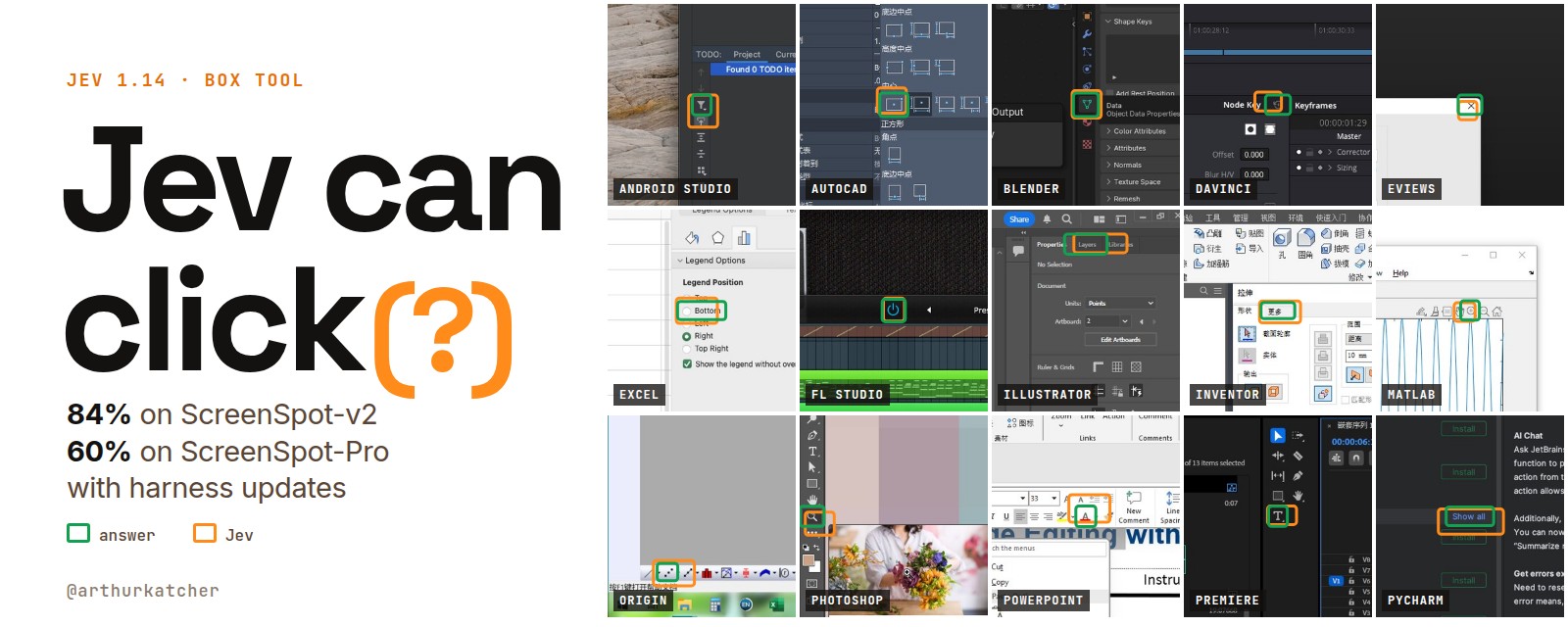
Jev is already the action picker in a lot of computer use agents. It is fast and costs almost nothing, so people want it to do the clicking too. When Jev 1.14 added a box tool that points at a spot on a screenshot, the question was whether it actually can.
I build harnesses that let agents use computers, so I ran it. On ordinary screens the answer was yes, 84%. On pro apps at 4K it was 19%, the bottom of the board.
What happened next is the part worth reading.
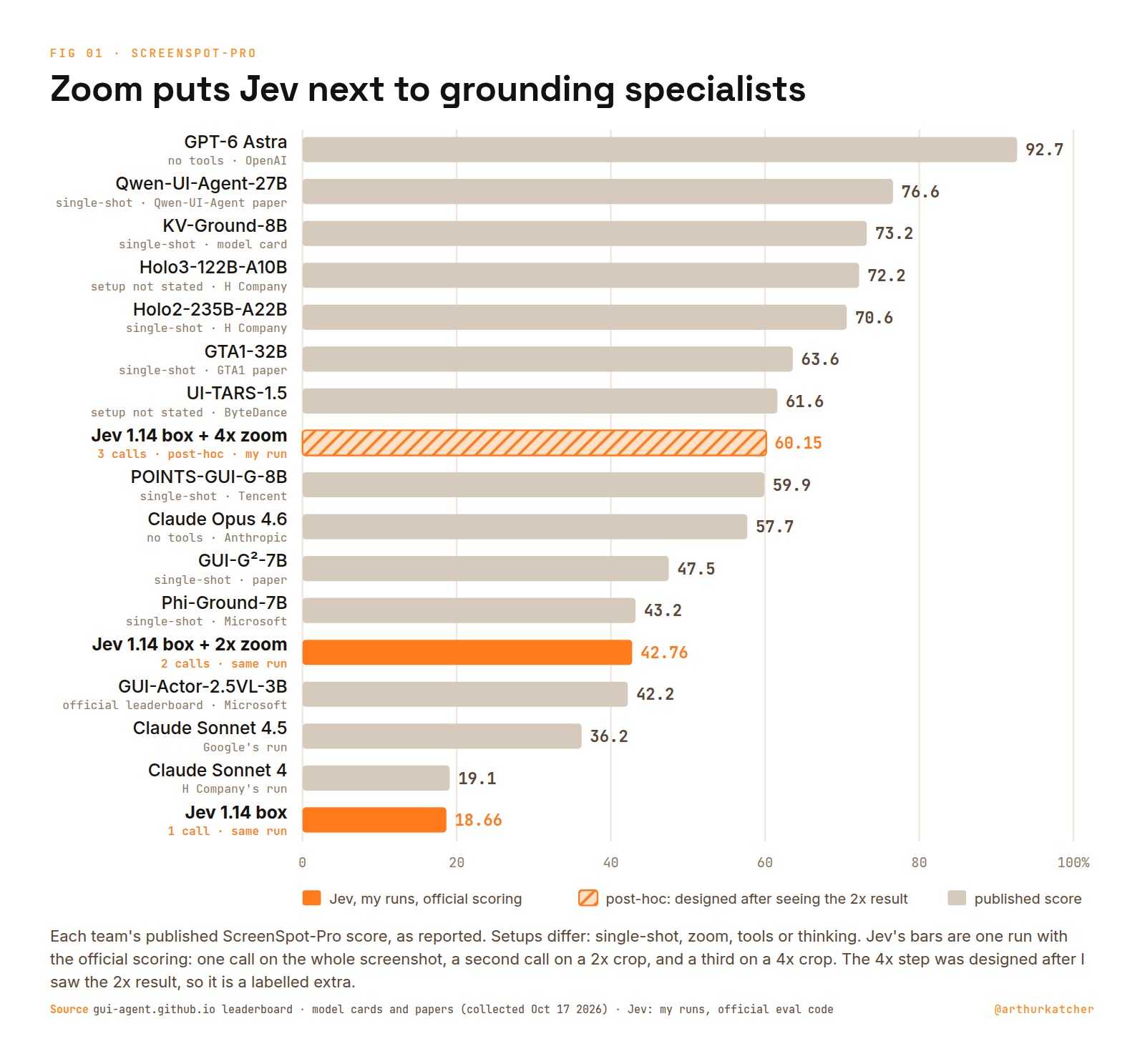
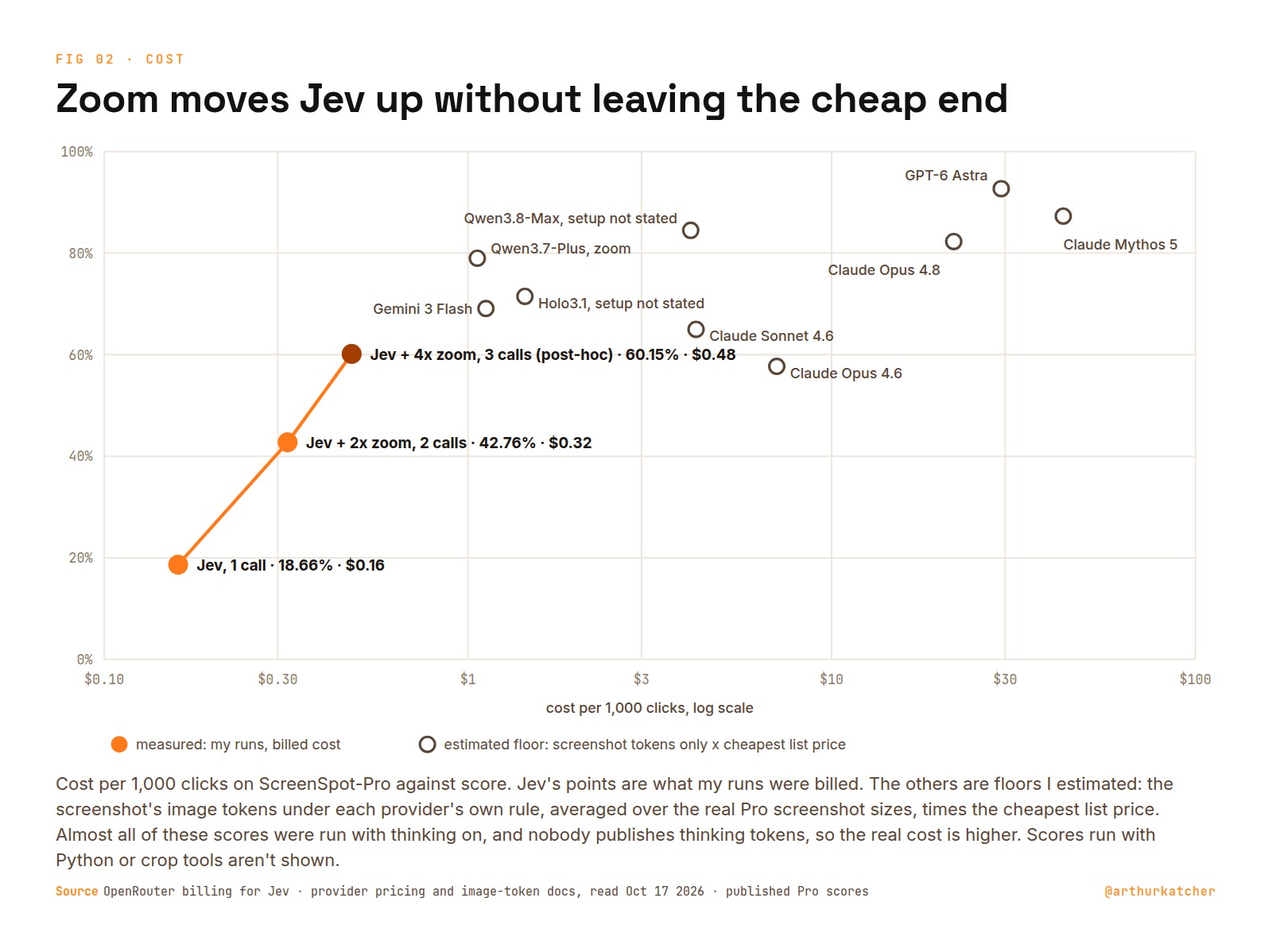
The bottom orange bar is that 19%, next to Claude Sonnet 4. The other two orange bars are the same model with nothing trained. Only the harness changed.
This is how it got there.
Nobody had checked
Before running anything, I looked for someone who had. TypeSafe itself calls images and box preview features:
I found no public ScreenSpot run of box, so I made one.
Finding the element an instruction refers to is called GUI grounding, and ScreenSpot is the standard test for it. It comes in two sizes. ScreenSpot-v2 has 1,272 targets on phone, desktop and web screenshots. ScreenSpot-Pro has 1,581 targets in professional apps like Photoshop, AutoCAD and MATLAB, mostly on 2K to 4K screens. Each case is a screenshot, an instruction and an answer box, and a click inside the box counts. Every target is either text or an icon.
Jev does not write text. You send it a state and typed questions, and it answers each one. A box question returns a rectangle on the image and a confidence.
The setup is as plain as I could make it. One request per click: the screenshot, scaled so both sides fit Jev's 280 to 1,568 px limit, and one box question. The click is the centre of the box Jev returns.
state = [
    {"type": "text", "text": "Screenshot of a user interface:"},
    {"type": "image_url", "image_url": {"url": data_url(screenshot)}},
]
questions = {"target": {"type": "box", "instructions":
    f"In the screenshot, the UI element to use for this task: {instruction}"}}
Scoring is each benchmark's official eval code in the leaderboard setting: English instructions, every case, micro accuracy (the share of all cases hit). The wording was fixed before the first call. No prompt tuning on test cases, no thinking model in front, no planner, no tools, no retries on wrong answers.
Before spending anything I ran offline tests, a smoke run checked by eye, and on Pro two independent review rounds of the harness. Every request, response and cost is saved. The end of the Pro run log:
scored 1581/1581, wrong_format 0, infra_error 0, not run 0
latency median 0.888s p90 1.396s, cost of logged responses $0.2523
That pass, 1,581 clicks, cost 25 cents. Even with the extra looks, Jev costs a fraction of anything near it on the board. The other points here are floors I estimated from list prices and each provider's image-token rule, before any thinking tokens, which nobody publishes.
To sort the misses I had AI reviewers look at each screenshot with every answer drawn on it, then ran a second pass and a spot-check on their calls. The guardrails are the ones from my last article:
On ordinary screens, Jev can click
First came ScreenSpot-v2, and Jev hit 84.36%. On phones alone it hit 89%. A v2 task looks like this one, with a target close to the median size:
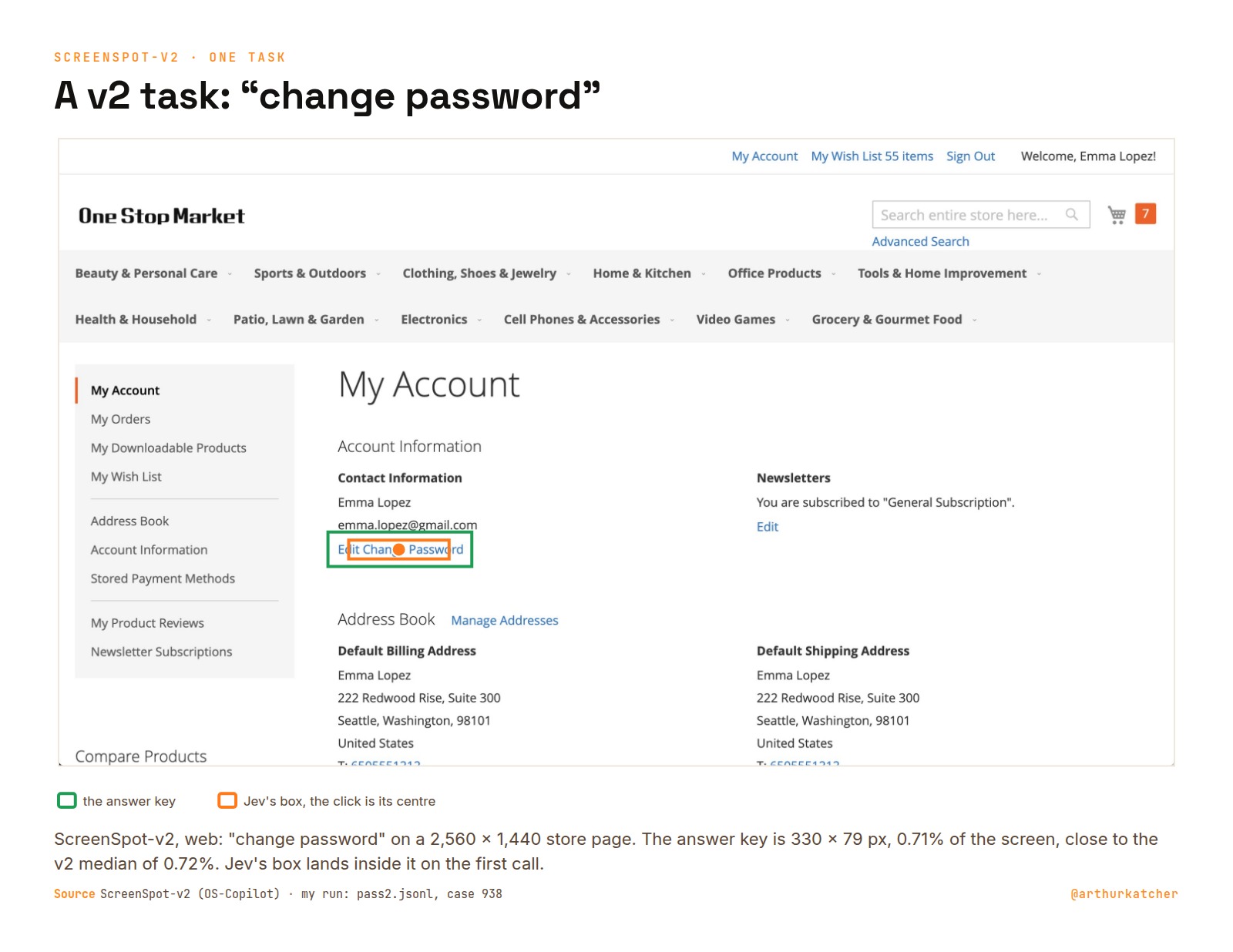
Most of the misses were close. The median miss lands 24 px from the target in the image Jev saw. Almost half are one pattern: Jev boxes the whole toolbar or row the target sits in, and the centre of that box lands beside it.
A miss that lands next to the target is the kind a closer look should fix.
So I let it look twice
TypeSafe's Diogo describes box as closer to pointing than to detection:
If it points, it can point again. Foveation is how eyes work: look roughly, then look again, closer, where you pointed. My zoom step does the same. Call 2 crops half the width and half the height of the screenshot, centred on call 1's box, and asks the same question. The crop goes in at the same image size as the full screenshot, so every target in it comes out twice as big. The answer maps back to the full screen.
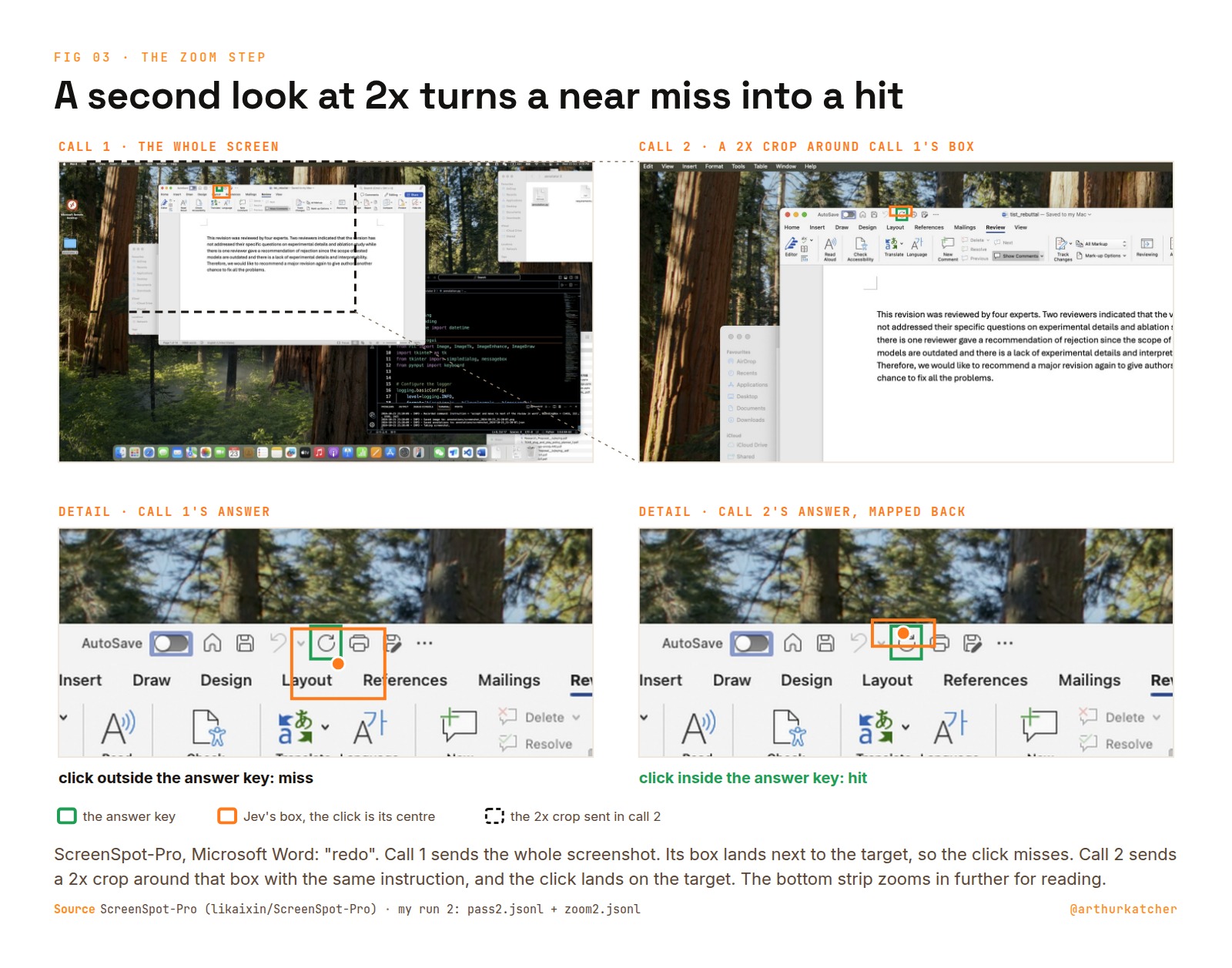
On v2 this adds 3.5 points, from 84.36% to 87.89%: 95 misses fixed and 50 hits broken. A plain rerun flips only 3.9% of cases, so the gain is real and not noise. The breaks are mostly small slips, plus crops that cut off the label naming the target.
The zoomed answer also comes with a confidence you can use. On v2, zoomed answers at 0.9 confidence or more were right 98.7% of the time.
Then I froze the rule before the first Pro call, so nothing in it is tuned on Pro.
In Photoshop, it can't
On ScreenSpot-Pro, Jev scored 18.66%. That is where Claude Sonnet 4 sits, at the bottom of the board.
Same model, same prompt, same harness. What changed is the size of the things it has to hit. The median Pro target covers 0.035% of the screen, against 0.72% on v2, about 20 times smaller. A 4K screenshot also has to shrink to 0.41x to fit Jev's limit, so a 40 px icon arrives as 16 px. In the image Jev actually gets, the typical Pro target is 21 px. Here is a Photoshop task on a screen the same size as the v2 one:
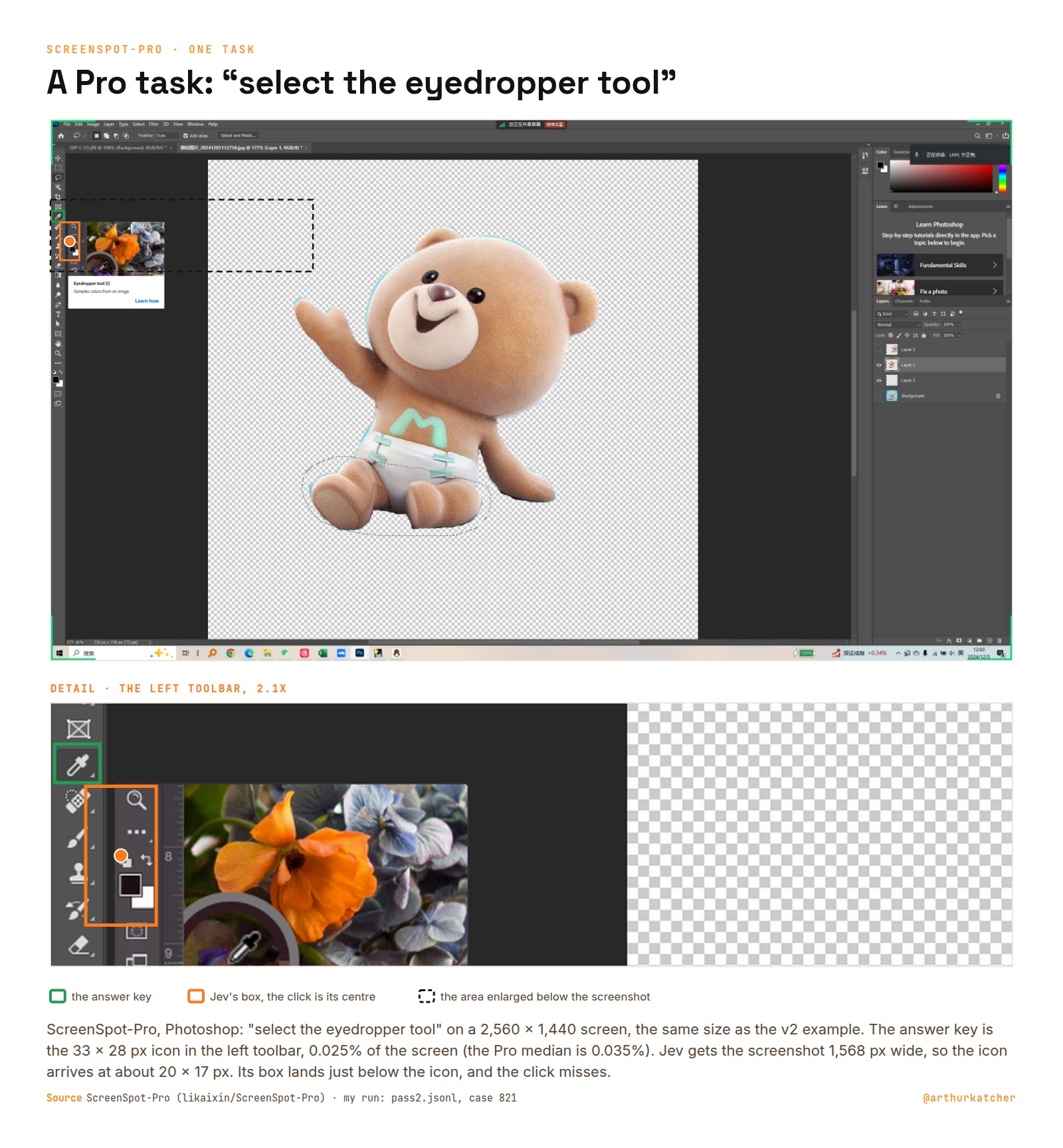
The second look was already frozen, and it would make that typical target 43 px. I ran it untouched.
The second look was worth 24 points
Pro went from 18.66% to 42.76%, with 436 misses fixed and 55 hits broken. That is 24 points, about seven times the v2 gain.
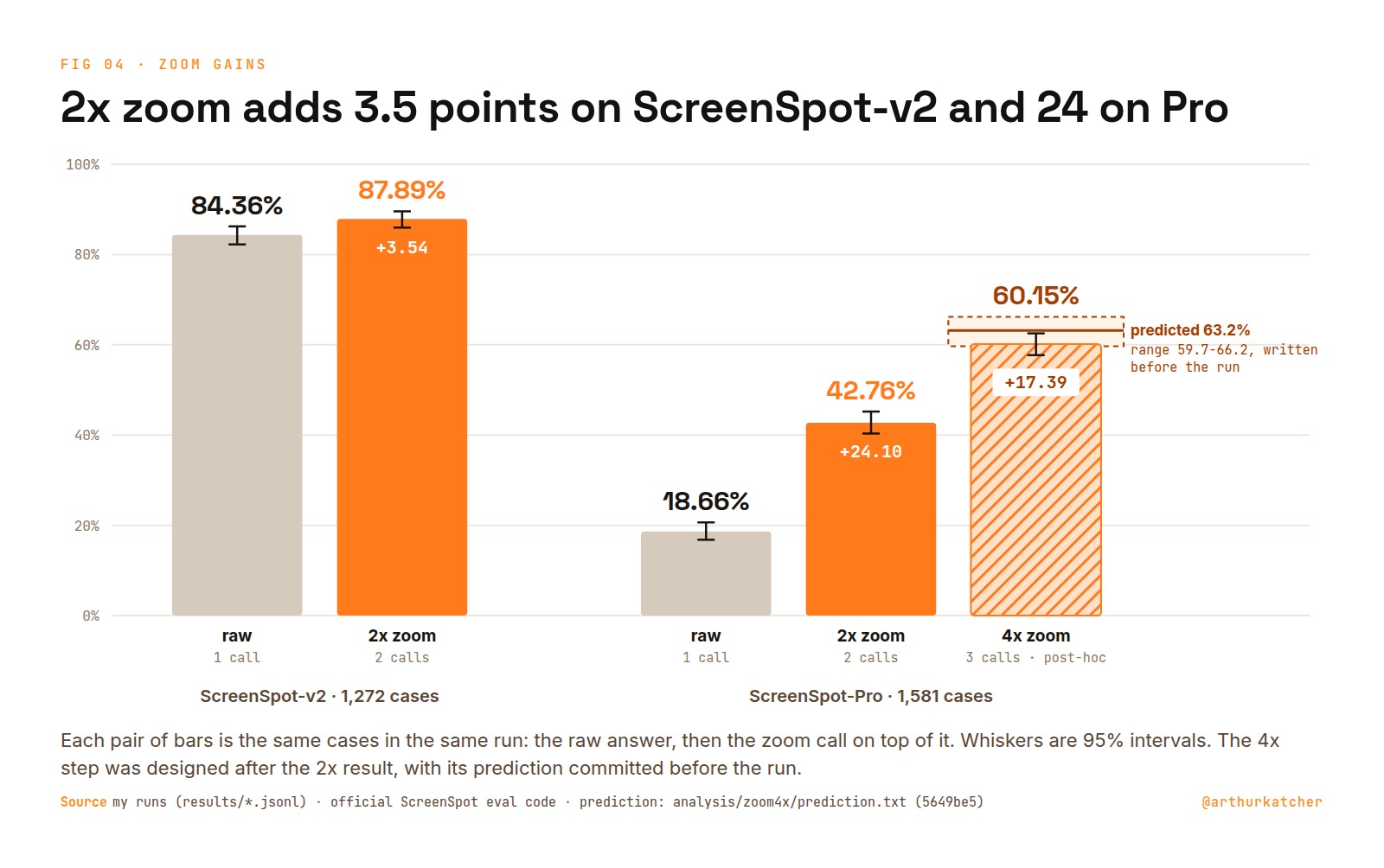
That is the middle orange bar in the first chart, between Phi-Ground-7B at 43.2% and GUI-Actor at 42.2%, models trained only for this job. All the runs in one place:
| Benchmark | Setup | Calls per click | Score | Cost per 1,000 clicks |
|---|---|---|---|---|
| ScreenSpot-v2 | Jev box | 1 | 84.36% | $0.15 |
| ScreenSpot-v2 | + 2x zoom | 2 | 87.89% | $0.30 |
| ScreenSpot-Pro | Jev box | 1 | 18.66% | $0.16 |
| ScreenSpot-Pro | + 2x zoom | 2 | 42.76% | $0.32 |
| ScreenSpot-Pro | + 4x zoom, post-hoc | 3 | 60.15% | $0.48 |
- Raw is one call on the whole screenshot. Raw and zoom are the same run, so each zoom row is the same cases seen again. A separate raw pass scored 83.33% and 19.17%, the same within noise.
- The 4x row was designed after I saw the 2x result, and its prediction was committed before it ran. It is a labelled extra, and 42.76% stays the clean Pro number.
- Every score uses the official eval code and answer key, including the cases where I think the key is wrong.
- Costs are what OpenRouter billed. The key balance matched my logs to the cent.
- The other scores in the first chart are as published, with different setups: single-shot, zoom, tools or thinking. Grounding models given their own zoom step score higher, for example MAI-UI-8B at 70.9%.
Why seven times more on Pro? Size decides most of it. Below 20 px Jev almost never hits. Above 80 px it hits 85%. Each zoom step doubles the target, so the typical one moves from 21 px to 43 px to 88 px.
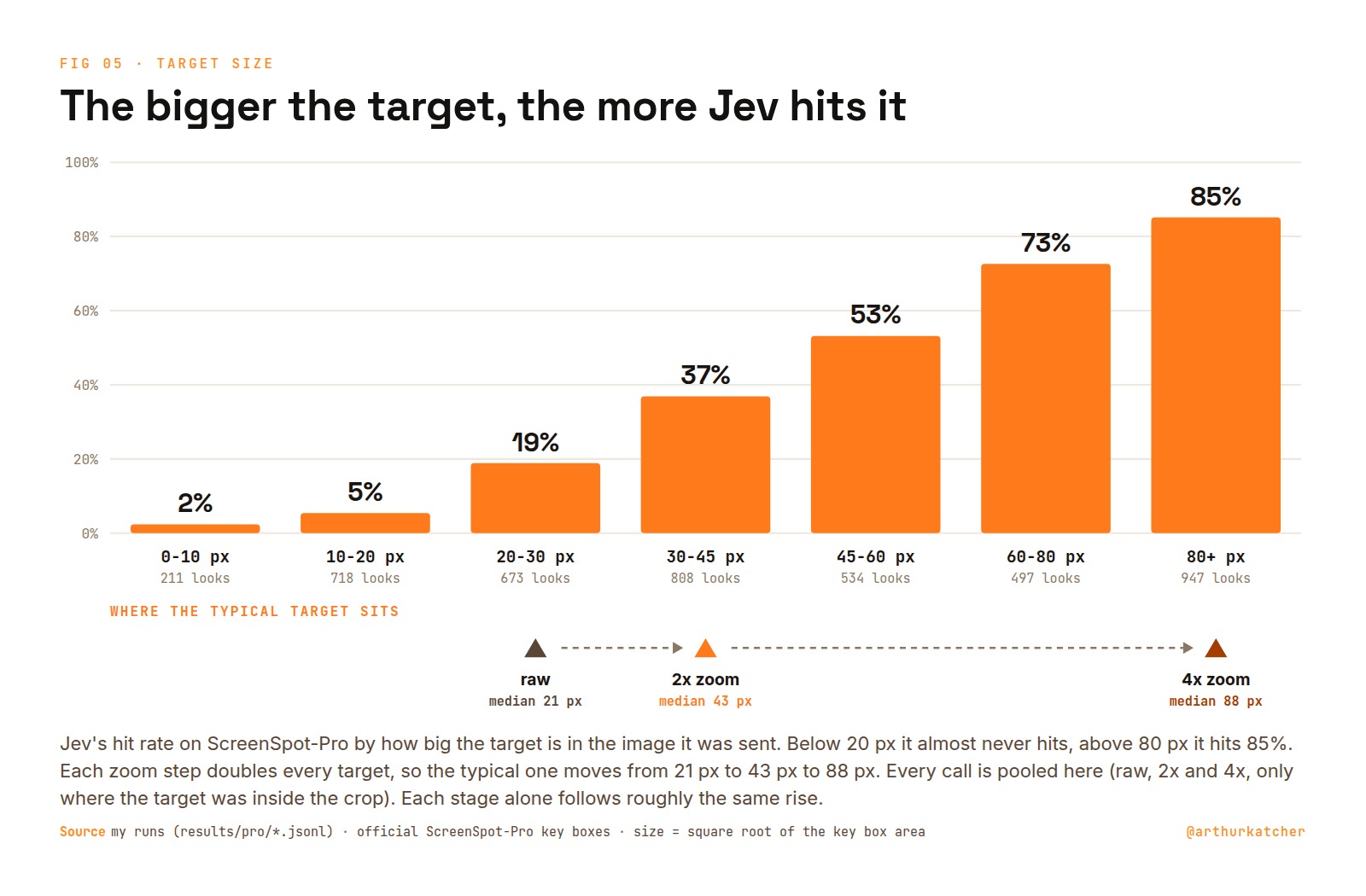
Aviz Maeir found the same in his own tests the day after launch. His box misses were tiny targets like a "+" button or a page number.
Size is not all of it. Pro is still harder at the same apparent size, by 20 to 35 points against v2. Its screens are dense toolbars of icons with no text, and 295 of its cases ask in English about a Chinese interface.
A third look, called before it ran
If a second look doubles the target, a third should double it again, from 43 px to 88 px. I wanted to know whether I understood the effect well enough to call the number before seeing it.
So before any call I committed a prediction to git: 63.2%, with a range of 59.7 to 66.2. The step is a 4x crop around the 2x answer, a third call per click.
It scored 60.15%, inside the range and 3 points under the centre, with 340 misses fixed and 65 hits broken. That is the top orange bar in the first chart, next to UI-TARS-1.5 at 61.6% and POINTS-GUI-G-8B at 59.9%, though those are single-call scores, and Jev here makes three calls.
I designed this step after seeing the 2x result, so it is an extra. 42.76% stays the clean Pro number.
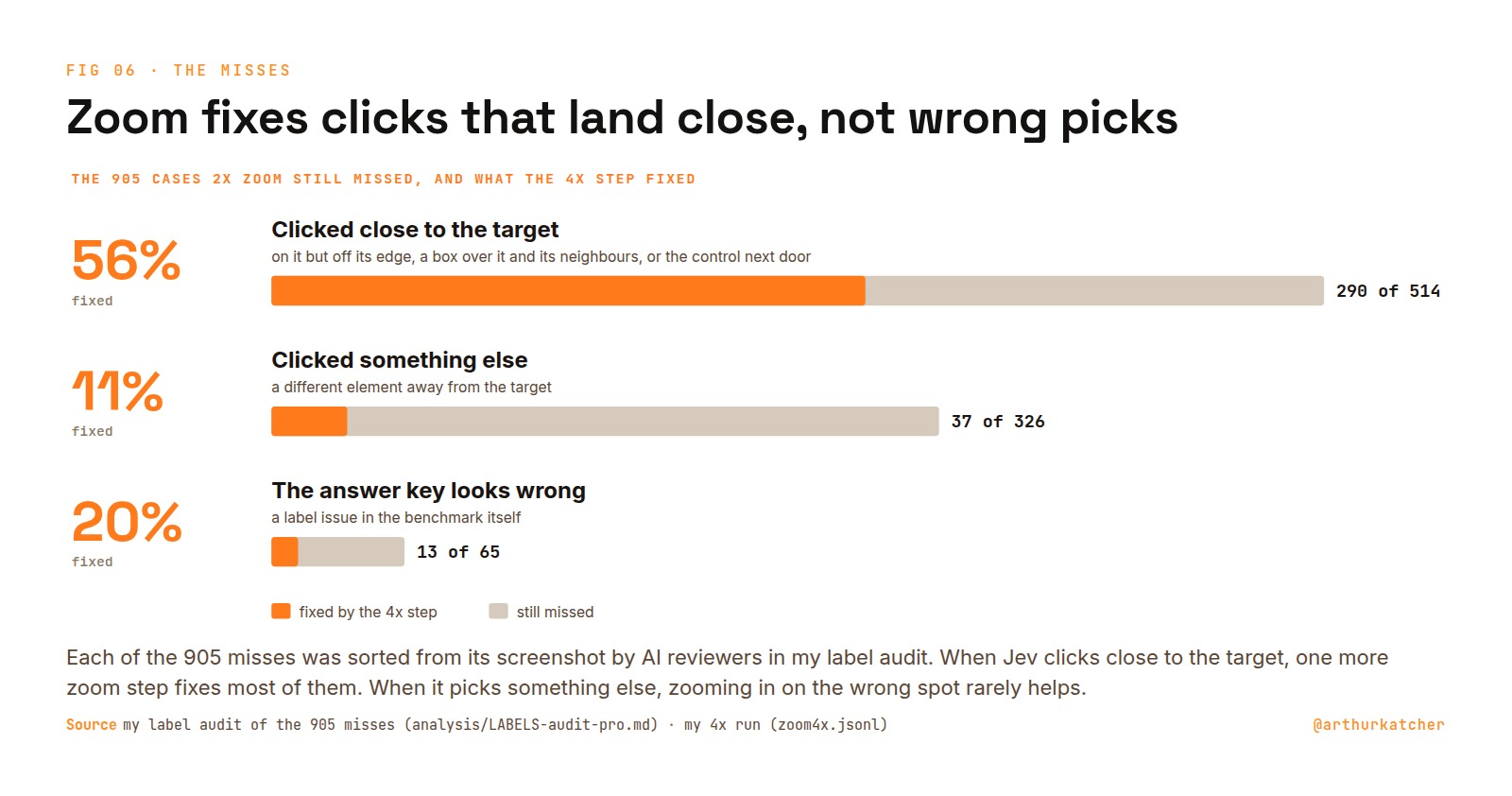
It also shows where zoom stops. Of the clicks that still missed after 2x, the 4x step fixed 56% where Jev had clicked close to the target, and 11% where it had picked something else. Looking closer at the wrong spot rarely helps.
Except on phones
That is also why one platform never moved:
| ScreenSpot-v2 platform | Cases | Raw | + 2x zoom | Change |
|---|---|---|---|---|
| Mobile | 501 | 89.42% | 89.02% | -0.40 |
| Desktop | 334 | 85.93% | 91.32% | +5.39 |
| Web | 437 | 77.35% | 83.98% | +6.64 |
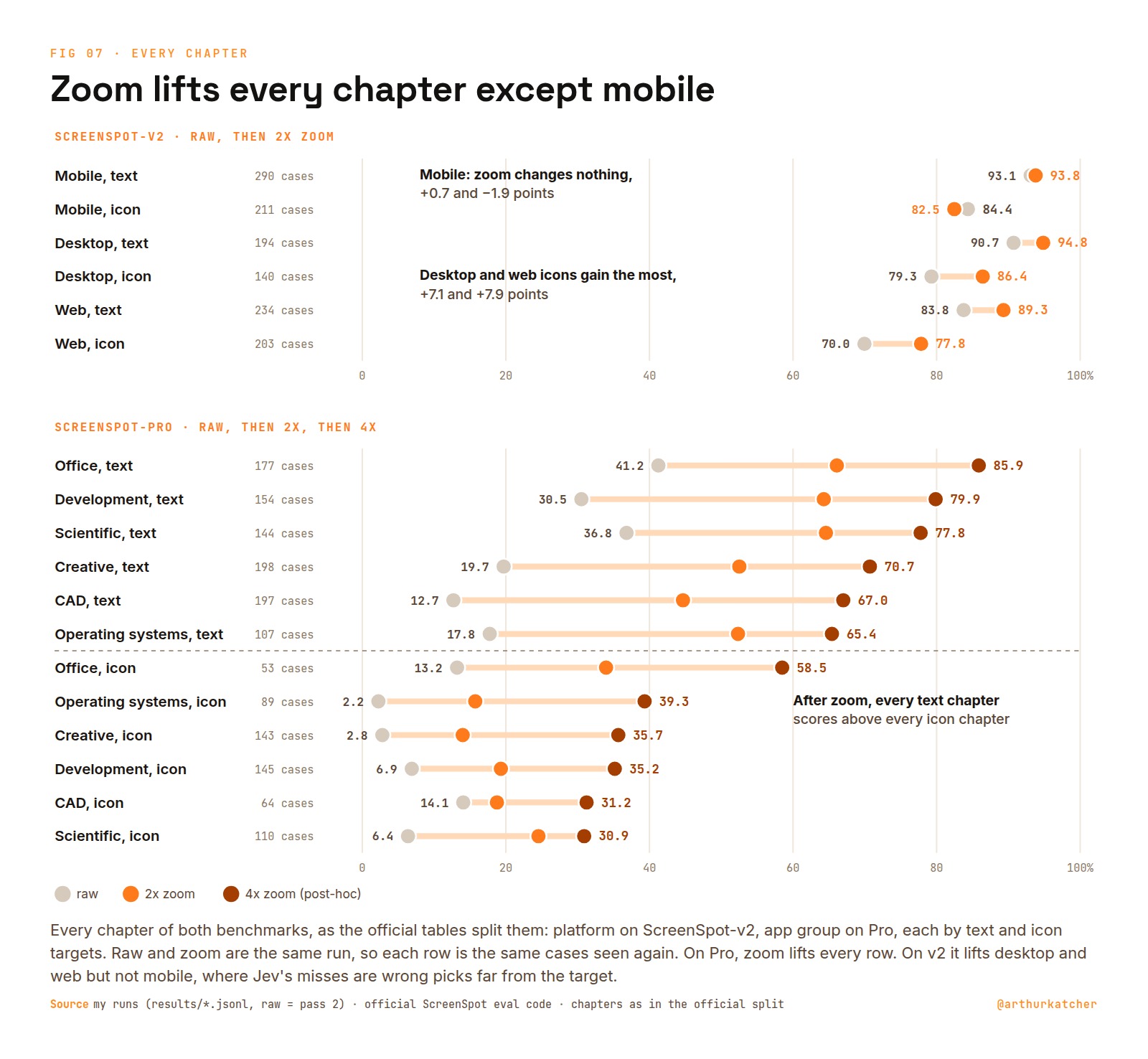
Mobile is Jev's best platform raw, and zoom does nothing there. Its mobile misses are not near misses: a median 95 px away on text and 228 px on icons, against 10 to 19 px on desktop and web. Jev picked a different element, so a closer look does not help. A half crop of a phone screen also often cuts off the row label that names the target: 9 of the 14 clicks zoom broke that way were mobile settings rows.
Both benchmarks also score their cases in chapters, by platform on v2 and by app type on Pro, each split into text and icon targets. Every chapter shows the same split. On Pro zoom lifts every row, and after zoom every text chapter scores above every icon chapter.
The benchmarks have bugs too
Looking at every miss turned up label problems in both benchmarks. On v2, one answer box was copied from another screenshot and sits on empty space. On Pro, one English instruction says "redo" where the original Chinese says undo.
On Pro the label problems are worth at most 2.3 points, so the misses there really are the model. I reported them upstream:
| Benchmark | Misses with a label issue | Broken tasks | Reported |
|---|---|---|---|
| ScreenSpot-v2 | 43 of 271 | 4 wrong keys, 1 duplicate case | OS-Atlas #65 |
| ScreenSpot-Pro | 65 of 905 | 3 wrong labels, 1 contradictory pair, 2 near-duplicates | Issue #32, HF #5 |
The 271 are every v2 case at least one run missed, and the 905 every Pro case the second look still missed. None of this changes my scores. They stay on the official key.
What this does not show
- One model version,
jev-1.14-20261014, and box is a preview feature. The next version could move every number. - Jev is not deterministic. On v2 the same request twice returns the same box only 30% of the time, though the click moves a median 4.8 px.
- I re-ran no other model. Their scores are as published, and their costs are my estimates.
- ScreenSpot is one click on a still screenshot. A real agent also has to notice when the target is missing, and box always returns a box.
Nathan LeClaire, who worked at TypeSafe, says the same: treat box as one signal among several.
My 5 rules
So can Jev click? Yes, if you let it look twice. The harness I would ship from these runs:
- Send the screenshot with one box question and click the centre of the box.
- Ask again on a crop half the width and height around that box, and map the answer back.
- Skip the second look on phone screens, where the misses are wrong picks.
- Trust zoomed answers at 0.9 confidence or more. Send the rest to a check or a stronger model.
- On dense 4K apps, add a third look at a quarter crop.
The harness, every request and response, the run logs and the audits are at github.com/arthurkatcher/jev-click-bench. A full v2 pass costs about $0.19, so you can check any number here for less than a dollar:
python3 screenspot.py run --pass 1 --workers 4
Next I want a crop that keeps whole rows on phone screens, tested on a separate set so the benchmark stays untouched.
For how people wire Jev into agents in the first place, see my earlier article, How to engineer a Jev harness.
I build harnesses that let agents use computers. If you run Jev for clicking and want to compare notes, reply or write to me.